Security has always been at the core of Limit Login Attempts Reloaded. From protecting millions of WordPress sites against brute force attacks to giving users better visibility into login activity, our goal has always been simple. Make strong security easy to implement and maintain.
With the release of Version 3.0, we’re taking a big step forward by introducing Multi-Factor Authentication (MFA). This is one of the most requested features we’ve had, and we’re excited to make it available to both free and premium users.
Why MFA Matters More Than Ever
Passwords alone are no longer enough. Even strong passwords can be compromised through data breaches, phishing attacks, or reused credentials across multiple sites. Once an attacker gets access, it often leads to much bigger problems.
Multi-Factor Authentication adds a second layer of protection by requiring something beyond just a password. Even if login credentials are exposed, unauthorized access is stopped in its tracks. For WordPress site owners, this is one of the most effective upgrades you can make to improve security.
Simple, Email-Based 2FA That Just Works
We built this feature to be powerful, but also incredibly easy to use.
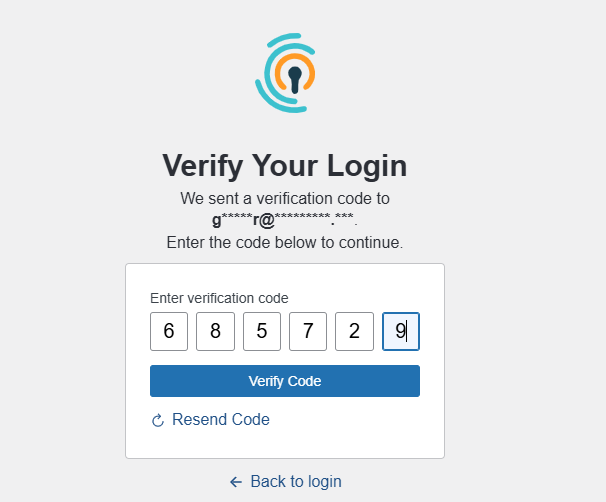
With Version 3.0, you can enable email-based 2FA in just a few clicks. Once it’s turned on, users will receive a one-time verification code via email after entering their password. They simply enter that code to complete the login process.
There’s no need for external apps or complicated setup. It’s a straightforward way to significantly improve security without adding friction.
Flexible Control by User Role
Not every user on your site needs the same level of protection, and we wanted to reflect that.
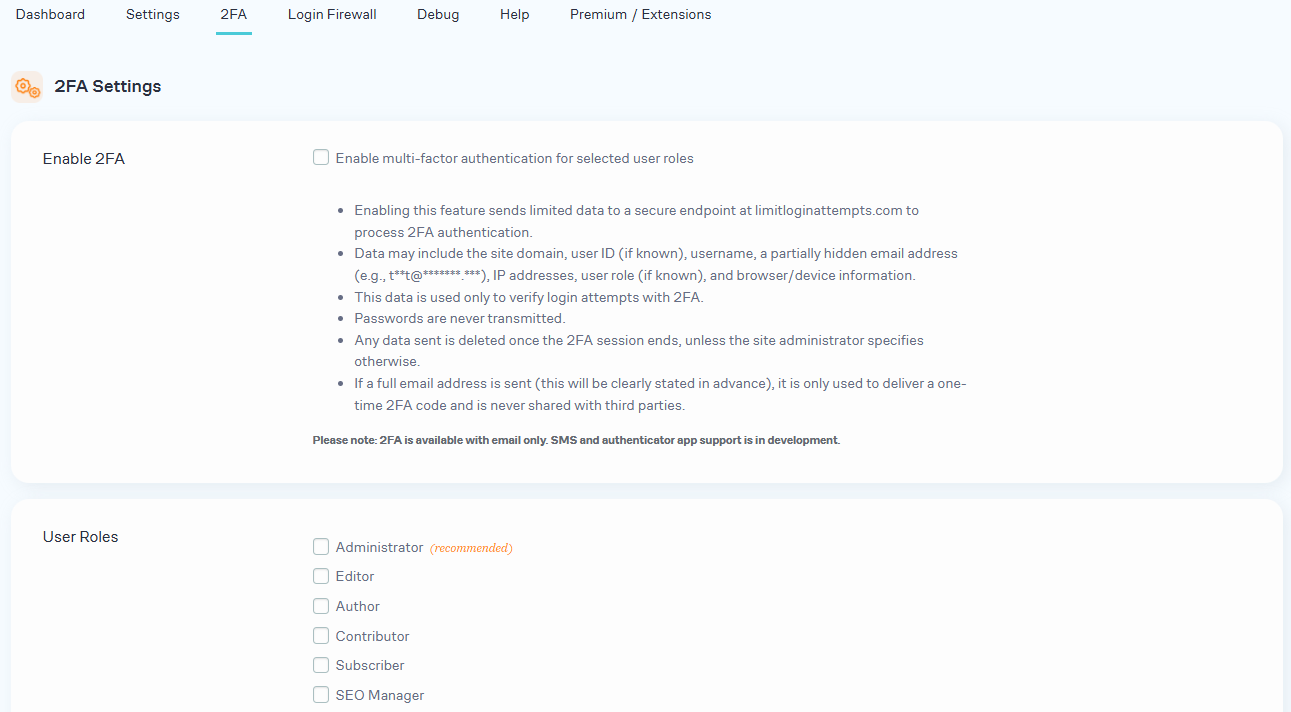
You can enable MFA based on specific permission groups like administrators, managers, editors, or any custom roles on your site. This allows you to lock down high-risk accounts while keeping things simple for lower-level users if needed.
It’s a practical approach that aligns with how most WordPress sites are actually managed.
Protection Without the Lockout Risk
One of the biggest concerns with MFA is getting locked out of your own site. We’ve built safeguards to prevent that.
Limit Login Attempts Reloaded provides backup access keys that allow users to regain access if they’re unable to complete the second authentication step. You get the added protection of MFA without introducing unnecessary risk or frustration.
A True Layered Security Approach
MFA doesn’t replace your existing protections. It strengthens them.
This new feature works alongside our IP intelligence and threat detection to create a more complete security system. Brute force attacks are blocked, suspicious IPs are identified and restricted, and now even if a login attempt gets through, MFA adds an additional barrier.
This layered approach is what modern WordPress security should look like.
Available for Free and Premium Users
We believe foundational security should be accessible to everyone.
That’s why email-based MFA is included for both free and premium users in Version 3.0. You can turn it on and start protecting your site right away without needing to upgrade.
What’s Coming Next
This is just the beginning of what we’re building around authentication.
We’re already working on additional MFA options for premium users, including SMS-based authentication and support for authenticator apps like Google Authenticator. These options will give you more flexibility in how you secure your site based on your needs.
Take Control of Your Login Security
If you’re already using Limit Login Attempts Reloaded, upgrading to Version 3.0 is one of the fastest ways to strengthen your site’s security.
If you’re not using LLAR yet, there’s never been a better time to start.
Turn on MFA, protect your users, and take control of your login security.
About the Author
Greg Fisher has over 20 years of digital marketing experience. Along with Alex Benko, Greg’s has owned and operated several companies including an online travel agency, tour reservation software, and web host. Greg’s responsibilities at LLAR include marketing and user expansion.